

As I explore the city of Barcelona, I'm fascinated by the ease with which the city can be navigated. It's more than the ample bike lanes and easy transit options—it appears to be cultural as well.
X.commerce: designing a lingua franca
"The face of commerce is going to change more in the next three years than the last fifteen," said John Donahoe, President & CEO of eBay.
X.commerce live notes—Keynote
Simple Technical Writing Guidelines
Working with Social Privilege
If you had to go online today to find a photo that represents your company or business team, how easy would it be? Could you simply search for “business” on a stock photo site? How many words would you have to add to find a picture of someone in your profession who resembles you? In what circumstance would it be easier, or harder? Whether it is finding a photo, talking comfortably with co-workers about your personal life, or simply feeling safe or welcome in the neighborhood of your office, the degree of ease or difficulty you experience in any of these scenarios could be the result of social privilege.
The term “social privilege” is used to explain a phenomenon where unearned advantages are awarded to people in a dominant social group. Presumptions of innocence, credibility, or competence are all advantages of social privilege. Though it may seem to be an uncomfortable topic, it is important to realize that privilege has broad-reaching benefits Causeit had to search for quite some time to find this photo on a popular stock photo site. Why is it so hard to find women of power in images? Look at the photographer's mindset and the buyer's assumptions. and disadvantages for everyone. People in the United States who are identified as being a part of the dominant group of white, male, heterosexuals are still subject to the effects of oppression, even if only because of how narrow thinking can be in places without diverse contributors.
Privilege is not always visible. In addition to race, gender, and sexual orientation there are a number of other assumptions that we may hold in everyday interactions with others. Our ideas about family structure, class, and mental health may disadvantage or privilege others in our eyes based on what we think we know about them. When privilege is further examined as an intricate web of experiences and interactions, almost everyone can see places in their lives where they feel either accepted or othered as a result of cultural presumptions.
At Causeit we do not see social privilege as good or bad, but we acknowledge that it exists and has real effects on our businesses and our lives. One example of the power of social privilege in business is the archetype of the white, hetero-masculine businessman that still serves as the dominant image of success. Another is the difference in the perception of an assertive woman compared to an assertive man in the workplace. When we examine the expectations we hold for different roles in business, we can start to see how social privilege norms may be affecting our workplace.
At Causeit we believe that social privilege can be shared and exercised for good! While we can’t choose whether we receive social privilege, we do have a choice of how to use it. We can challenge privilege by recognizing the value of experience and knowledge that is different from our own. We can subvert our own privilege by advocating for a diversity of voices, prioritizing those that are often not heard. We can share privilege by using our influence to empower others in a system where they are disadvantaged. With that said, it is not necessary to try to map out every complexity of social privilege that exists in your life. Instead, try to live and work in a way that acknowledges social privilege by asking yourself what assumptions you hold and where they might be coming from. Questioning ideas we have about the people we interact with is a positive way to make our workplace a more comfortable and more diverse community that is better equipped to take on all obstacles to success.
The term “social privilege” is used to explain a phenomenon where unearned advantages are awarded to people in a dominant social group. Presumptions of innocence, credibility, or competence are all advantages of social privilege. Though it may seem to be an uncomfortable topic, it is important to realize that privilege has broad-reaching benefits
Privilege is not always visible. In addition to race, gender, and sexual orientation there are a number of other assumptions that we may hold in everyday interactions with others. Our ideas about family structure, class, and mental health may disadvantage or privilege others in our eyes based on what we think we know about them. When privilege is further examined as an intricate web of experiences and interactions, almost everyone can see places in their lives where they feel either accepted or othered as a result of cultural presumptions.
At Causeit we do not see social privilege as good or bad, but we acknowledge that it exists and has real effects on our businesses and our lives. One example of the power of social privilege in business is the archetype of the white, hetero-masculine businessman that still serves as the dominant image of success. Another is the difference in the perception of an assertive woman compared to an assertive man in the workplace. When we examine the expectations we hold for different roles in business, we can start to see how social privilege norms may be affecting our workplace.
At Causeit we believe that social privilege can be shared and exercised for good! While we can’t choose whether we receive social privilege, we do have a choice of how to use it. We can challenge privilege by recognizing the value of experience and knowledge that is different from our own. We can subvert our own privilege by advocating for a diversity of voices, prioritizing those that are often not heard. We can share privilege by using our influence to empower others in a system where they are disadvantaged. With that said, it is not necessary to try to map out every complexity of social privilege that exists in your life. Instead, try to live and work in a way that acknowledges social privilege by asking yourself what assumptions you hold and where they might be coming from. Questioning ideas we have about the people we interact with is a positive way to make our workplace a more comfortable and more diverse community that is better equipped to take on all obstacles to success.
By Maggie Mahoney, with contributions by Jessica Long and MJ Petroni
Organize your Workflow: Process Document Tips
At Causeit, we understand how difficult it can be to create sustainability amid the inevitable chaos of running a business. For example, what happens when someone in your company gets sick or needs to leave work for a period of time? Can you still do payroll? Do you have the resources to train a new front-line worker unexpectedly? How can you better manage those one-time processes that never seem to get remembered? Don’t panic! The solution to all your project management breakdowns and confusions is what we like to call a process document! A process doc (we’ve shortened it for efficiency’s sake) is a written resource that explains all the steps in a given project so that you don’t have to.
Writing a process doc does not have to be painful. In fact, they can prevent unnecessary grief in the future. With a strong template and a commitment to keeping it updated, a process doc can act as a living, breathing contribution to your organization.
Here are some tips for creating a strong process document:
Document a working process—don’t try to reinvent the wheel. You should not make up a process as you write it. A process doc should be created from an existing way of doing things. Build on what you know so that others can benefit from your experience.
Strike a balance between too much detail and overly general steps. You should assume the person reading this is smarter than the average monkey, but watch out for shortcuts you might take for granted in your own process.
Don’t miss a step! Like we said before, it’s easy to skip steps or make logical leaps when you’ve been the person completing the process for the last year. Be nice to the next person, include all the steps.
Include a trigger. Process docs don’t work when they aren’t used. Think of what event should send us to the document for an answer and make that the first step of the doc (i.e. receive phone order).
End of your process doc with a clear deliverable. This document is supposed to achieve a clear goal. Be clear about what you want the result of this the process to be.
Add a timeline. If appropriate (and it usually is), attach dates or times to each step to show when things should be done (i.e. within a day, hour; by the third of every month, etc.)
A process doc can be made for any project or task in order to increase efficiency and flow. Step-by-step instructions are easy to follow even for someone who has never done the job before. A process doc can be a lot of help, but it is only useful if its content is relevant. Remember to keep your process docs up to date. So write it up, review it often, and make your life a little bit easier!
Anti-trust settlement could pave the way for more accurate, yet more confusing credit card fees.
Back in 2008 the Justice department began to probe both Visa Inc and Mastercard Inc over policies intended to prevent "steering", the act of influencing customers to use cards that have low interchange fees so as to reduce the cost of taking those cards to the business. This could be in the form of incentives or discounts which the Justice Dept argues "impose a competitive straitjacket on merchants, restricting decisions by them to offer discounts, benefits and choices to customers that many merchants would otherwise be free to offer," Currently, this is illegal. In fact, I had a friend send me this picture just the other day.
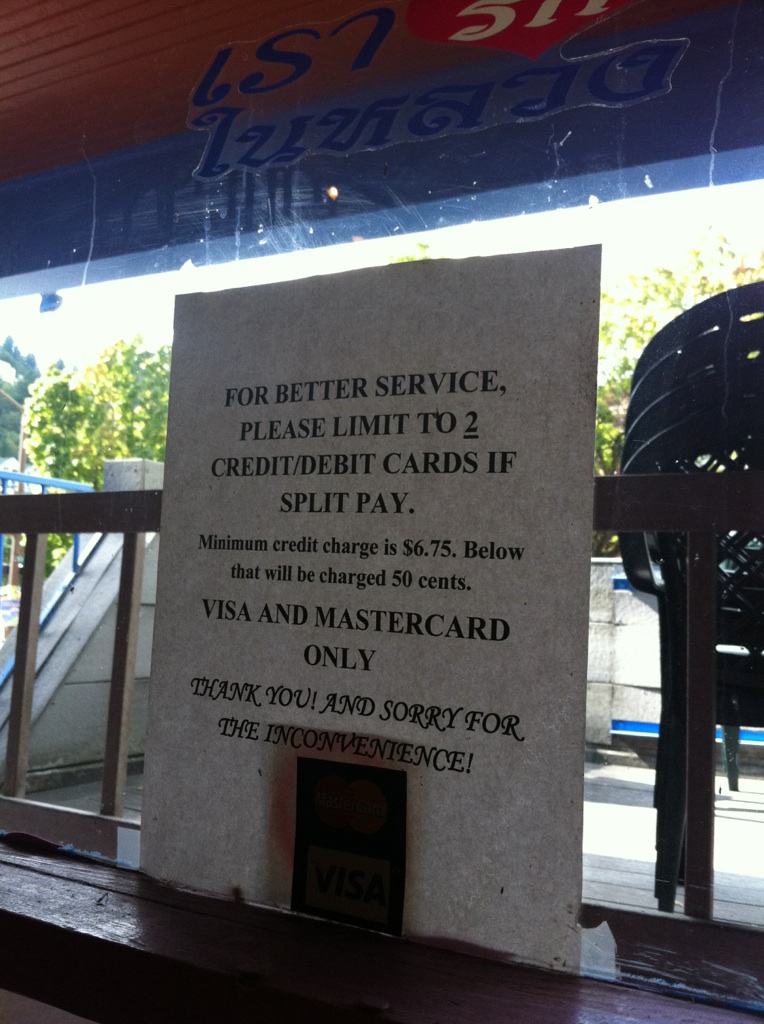
How one business deals with credit cards.
As you can see, some businesses are pretty aggressive in steering their clients, sometimes to the point of completely disincentiving the use of cards. Most businesses don't realize this, but Visa and Mastercard have put a lot of money into making sure that this is illegal, until the settlement just days ago, which has yet to be approved by a court before going into effect.
Before this settlement, cards were a form of legal tender in the USA. That means you can't reject them for any reason in your business. If someone wants to pay with a card, it's as good as cash. What's the downside? As a consumer, you were well within your legal right to say, "I refuse to pay your fee or meet your minimum credit card limit just to use my card."
With the settlement of this lawsuit, now businesses can disincentivize you from using a credit card. "The settlement this past week means that about 4 million merchants nationwide that accept only Visa and MasterCard are now free to steer customers to different credit cards or forms of payment by offering discounts, rebates or other special treatment, the Justice Department said." That means now it's legal to charge you .25 to use your card, or have a minimum charge before they accept cards. Good or bad? You can weigh in by commenting below.
This lawsuit is just the beginning of a long conversation into how non-cash payments will function in relation to businesses. Many businesses feel oppressed by credit card fees. My heart sinks everytime I hear a business owner say, "I might as well give this pack of gum (or other small ticket item) away if someone wants to buy it with a card, it's cheaper!" If that's the case, they're actually not setup correctly.
Visa and Mastercard have programs specifically for businesses with average tickets of less than $15 just for this reason. If your business is not making money due to accepting credit cards, it's time to find a new merchant processor. Would you stay with your insurance agent if they had the wrong limits on your home or auto? The sad part is, many people don't realize where they stand in relation to these issues. Stay educated, or find someone you trust who can manage it for you. It will improve your bottomline!
Other links for news on this topic:
http://usat.ly/cBmQk9http://bit.ly/bTtxpXhttp://bit.ly/9XvgmYhttp://bit.ly/cQDzBG
http://bit.ly/bgzLtvhttp://reut.rs/c7ORYg
Matt Koren is the President of Priority Payments Northwest, a Merchant Services Provider located in Portland, OR. He runs his company in addition to his management consulting practice as an Associate with Causeit, Inc. You can contact him by filling out the Contact Us page, or by calling 503-493-7332.
How to Win With a Project Manager in Your Small Business
When does it make sense to bring a project manager into your small business?
People have different roles for project managers within their business. In my business, I have about eight hours of meetings with project managers per month. In those meetings, I process the tasks in my inbox and triage them into Remember the Milk, have conversations with the project manager about the feasibility of the commitments I have taken on/will be taking on/would like to take on, and start to get in communication with anyone I need to repromise to, revoke promises to or reschedule with. I also have higher-level conversations about processes for efficiency, total workload capacity and balance between different types of work.
For some small business people, the project manager also does a bit of cat-herding—checking in on tasklists and duedates, especially those which are past due. When they spot something which is lagging behind or flat-out has not been done—especially if there is a recurring theme of delay on that type of task—they have a conversation with the team member to see what they need to be effective. Sometimes that conversation looks like coaching to uncover any emotional or contextual roadblocks, and sometimes it is a process conversation to see what would make it easier to complete that task consistently.
Project managers also are likely to assist in the scoping/estimating process of bids to make sure that time conflicts, logjams and cost overruns are prevented wherever possible. For example, Causeit worked with one of our project managers in the process of constructing a bid for a large flat-priced graphic design project to ensure we met a minimum hourly pay rate and, thus, profitability.
In a smaller business, the project management accountability often falls on the business owner, general manager or an account manager. First steps for additional project management support, with a generally effective team who sometimes get overwhelmed (rather than a team with systemic problems around accountability, self-discipline and communication) are to implement some simple, low-cost solutions centering around reminding people of the promises they made. Technology solutions like Remember the Milk automate some of this process, and work particularly well when paired with a meeting with an outsider or other strictly-accountable team member who gently causes the conversation to come up on a regular basis (once or twice a week is best) and to stay on track.
In short, project managers serve to make sure the actions of your games get moved forward by ensuring actionable promises are made, recorded and managed. Contact us to have us facilitate an introduction to some of our favorite project managers, like Jodi Sweetman and Amye Scavarda!
Why the Love Affair with Gmail?
Gmail—everyone seems to know what it is, and a huge number of people use it. Hands-down, it's recognized as the best 'deal' in the free webmail scene. But why?
 A screenshot of Gmail's conversation view
In short, it comes down to Google's core values. Among them are "Focus on the user and all else will follow," and, paraphrased, "don't be evil." Running with this direction, Google's team (and a huge user community) turned on email on its side by acknowledging two core things: 1) people have conversations, not messages, 2) humans don't always think linearly and 3) keep powerful features easy.
Staying in the conversation
Gmail offers something few other email clients have been able to touch: effective threaded conversations. What is a thread? Imagine passing a note back and forth in class—writing a reply on the same page that you received a message on. Gmail pieces together the messages going in and out of your address to provide a cohesive view of a conversation—even if the messages are weeks apart—so that the context of messages is clearer. This way, instead of wading through pages of 'quoted' messages, which are often hard to read, a user can collapse and expand messages which came before and after whatever message they are reading. Often, this makes each message shorter, too, as introductions and conclusions are less necessary.
Needle in a haystack
Gmail also acknolwedges another truth—it's often easier to search than to sort. Since one conversation (Gmail parlance for a collection of messages) may reference multiple topics or a couple of different people, Gmail leverages its class-leading search technology to make it possible to effectively search all of the conversations in an account. That way, users don't have to try and remember when a message came in or even who sent it—they just search like they would Google. Searching email isn't new—but having instant results with miniatures 'teaser lines' of each message (much like a web search) was groundbreaking when released and is still basically unmatched in other clients.
Powerful, easy features
Gmail also does something almost no other mail client or service does successfully—it keeps its powerful features out of the way, but still accessible. Gmail offers a feature that many users may not be aware of: Labels. For example, all messages I receive from certain domains or addresses get labeled 'Clients'. Some of those same messages, depending on their content, might get labeled 'Deadlines.' Unlike most email applications, which would take these messages and move them into another folder, Gmail tags them—so that I can see the message both in my inbox, or when I look only through the lens of 'Clients'. An unlimited number of Labels can be combined, so that 'Finance' and 'Response required' can be independently or jointly applied to a message.
In another stroke of genius, any search you perform can become a filter or saved search—in other words, if you search for messages from clients which include attachments, Gmail offers the option to save that search as a filter so that you can then apply actions, such as labeling all of those messages automatically when they come in in the future (eg, 'Client Files').
Signal to noise
Perhaps the most powerful bit about Gmail is that it allows you to reduce the clutter and excess you view. First, Gmail has perhaps one of the best spam filters in the market. I have never had a conversation marked as spam accidentally, and I see maybe one spam message every three days in my inbox. One click of 'Report Spam' and I will never see that message again. Google combines the input of all of its users to have one of the most up-to-date anti-spam services anywhere.
Using a tool Gmail calls archiving, conversatons can be removed from your inbox without deleting them. This allows you to complete old conversations (which will come back into the inbox automatically if a new message is added to the conversation). For example, when I'm done conversing with my insurance agent about renewing my policy, I can click archive. At that point, I can still find the conversation through search or by clicking on the "All Mail" tab. From there, I can always bring the conversation back to the inbox if I want or need to. As a productivity tool, archiving is indispensable—it allows users to remove the clutter in their inbox and be clear about what emails still need to be managed or replied to.
Using the filters function discussed earlier, newsletters and other 'sometimes I want to read them' emails can be automatically archived, so that they are not in the way but can still be referenced. This is great for managing email subscriptions and listservs which can otherwise dominate an inbox.
In short, Gmail is the web app with the single biggest positive impact on its users—and absolutely no hit on their pocketbooks. The time it saves and the reliability it provides make it the first technology shift we recommend to our clients who don't already have it. Try it today!
Remember the Milk: Powerful Task Management for Free
Remember the Milk (or RTM for short) is a powerful, flexible and simple tool for managing tasks. Small business owners (and busy folk everywhere) know that having a mere to-do list is insufficient. Remember the Milk works by helping you quickly enter and triage your tasks so that you can get back to doing whatever it is that you do best without worrying about, well, how to remember to get the milk. And, like so many great web apps these days, it's a free service.

Remember the milk accomplishes sorting of tasks through a number of criteria:
- Due date (and time)
- Repeat (e.g. a reminder to send your mother a card every six weeks)
- Time estimate (estimated duration for the task)
- Status (completed/incomplete)
- Tags
- Location (the location where this task needs to occur, such as your preferred grocery store or the post office—as a plus, this serves to automatically alert you of the tasks due at a given location when paired with a GPS-enabled iPhone)
- URL (great for putting a direct link to the relevant site, especially if it's hard to remember)
- Postponed (a very revealing counter which lets you know how many times you've postponed, say, balancing your checkbook or cleaning the garage).
- Sharing (others who you have shared the task with so that it shows up on their to-do list—great for small teams/delegation)
- Notes (a place to add clarification of a task so that your list doesn't get cluttered with lengthy titles)
- Priority
The core service is free (save for certain reasonably-priced special features such as the iPhone app)—and it's a lifesaver. Every week I review my calendar and my task lists with a colleague, and we enter new things into the list while checking in on overdue tasks. Little to nothing falls through the cracks now, and if it does, I know about it quickly. While inputting all my work into Remember the Milk was sobering as I dealt with the amount of tasks I have every week, Remember the Milk allows me to know exactly when the tasks for the day are done and when 'someday' projects like updating business plans will be picked up next. Most importantly, it lets me say yes (or no) to requests from colleagues with complete knowledge of my project load.
For further reading, check out this excellent summary of David Allen's Getting Things Done methodology
Photo courtesy .fabio under Creative Commons license.
The Importance of Asking About the Contract: Our 29-Page Lease
In my work with clients, I often remind them how important it is to carefully review documents before signing them—especially as it relates to inserting yet more provisions.
For a while now, Causeit has been searching for a new office space. After a round or two of false starts, including one we were almost ready to sign on, we found the perfect spot. What has the new place work so well is that we carefully crafted a list of wants (negotiable) and needs (non-negotiable) before we ever saw an office. We even came up with a one-sheet of what it might look like and a list of our needs and wants: Our mini-floorplan and wishlist
This meant that when we looked through the lease (a generic and exhaustive document covering almost every industry and largely, of course, favoring the landlord,) we were able to quickly identify potential sticking points. Some of the changes we made:
- Negotiating a less-restrictive clause about bringing material in and out of the building (we have a lot of loading and unloading to do)
- Clarifying use of the office to include our deskshare concept for business incubation and network-building, so that no confusion would happen in the future regarding whether or not deskshares qualified as sublets
- Finding out exactly what we were permitted to do with the space regarding subletting and assignment (the process of handing off responsibility in the lease to another party) so that we know exactly what will happen when we go to expand
These are just little things, but, left unchecked, they can become a laundry list of little anxieties for the tenant as they attempt to conduct normal business without being in standing violation of their lease. As an added bonus, our new landlords were very impressed with our attention to detail in the lease, and knew that we were committed to open and honest communication—a bit of social capital (relationship) which could help, perhaps, in the selection process if we are in competition with more-established businesses when we next choose to expand to larger space in the building.
Use Google Docs to Share for Free
How many times have you wanted to work on a simple document with a friend or colleague, only to be stopped by problems constantly sending files back and forth? Or needed to share a spreadsheet with a client, only to find their copy of Excel won't open your file? As part of our series on web applications for small business, we'll take a look at Google Docs as a way to save you money.
Google Docs is a free service which allows you to work on basic documents (word processing, spreadsheets and presentations) in your browser. At a basic level, it provides the most commonly used functions of programs likes Microsoft Office for free. Your files are stored online, instead of on your computer—which means that crashes and viruses don't affect them, but your ability to access the web does (for example, if your cable modem goes out, you can't access your documents until you find another internet connection). This sort of online file storage is referred to as 'the cloud' in Web 2.0 parlance.
Google Docs also allows for the wonderful experience of jointly authoring or editing a document. Say, for example, that you are working on a notice from the board of your neighborhood association. You could try to get everyone together in the same room to edit at the same time, or attempt to pass around a document (while tracking revisions of it) or delegate the task to just one person.
Instead, Google Docs allows you to create or import a document and then share it with other users (either in an editing or read-only capacity) to make it easy for everyone to contribute (or just comment). No downloads, installations or virus-scanning is required. This is also a great way to work on joint budgets or other technical and rapidly-changing information. During one busy period, my partner and I used the spreadsheet function to track apartments we were looking at and the status of each rental application. It saved us a lot of 'missed leads' or duplicate communication. Google Docs can even send notifications to other users when a file is modified, taking out the step of emailing 'look at this change.'
While there are a few bugs in its implementation (formatting isn't as fluid, as, say, Apple's iWork program, or even Microsoft Word), the convenience of shared documents and the ease of use make Google Docs a great tool for just about any user looking to either save money on Office or bring friends and co-workers into the editing process.
Saving Money with Web Apps
If you've ever checked your free e-mail account from a friend's computer without paying a dime, you've experienced of glimpse of web apps. Most small business owners don't know that everything from accounting to conference calls can be achieved online for low or no cost, so we've chosen to write a series on small business savings via web apps. We'll evaluate the benefits, utility and cost of a number of applications. Since Causeit, Inc. is in the process of converting many of our desktop documents into web-capable systems, many of these trials will be supported by our own experience or those of our clients. Here are some of the potential topics [please suggest more!]:
- Mind-Mapping and Outlining Tools to Organize Your Thoughts
- Bookkeeping in a Browser: Online Bookkeeping & Invoicing
- Using Google Documents to Share For Free
- Teleportation: Remote Access and Meetings Via the Web
- Save on Saving: Online Backup Tools
- Can Facebook Actually Get You Clients?
- Using LinkedIn for Networking Knowhow and Reference-Checking
- Online Phone Systems: Press 1 For Cheap Voicemail & Calls
- Google Calendar: Scheduling Your Success/Workgroup Calendars for $0 a User
- Remember the Milk: Free, Powerful Online Task Management
- E-Mail Marketing: What's the Best Deal?
- Online Project Management: Does it Really Save Time?
Web apps, those hallmarks of the Web 2.0 age, have promised to be the future of computing. These apps are often as part of what's called a Software as a Service (SaaS) business model, where users pay for usage of the software on a subscription basis (sometimes with a limited or basic free version, occasionally ad-supported). As a general principal, web apps which charge a subscription fee offer flexibility to the purchaser, because you pay as you go, instead of a costly up-front fee. Take Freshbooks for example: Freshbooks, an online invoicing system whose feature set we will explore later, offers a number of different pricing models: a free version with support for one user and a total of three clients (suitable for demoing the product or the one or two clients you have who are postpaid) and a number of of paid versions with larger capacity and featuresets starting at about $14 per month.
First Look: Comapping: Shared Mind Maps
At Causeit, we often use outlines or other organizing tools to help process the huge volume of information and brainstormed ideas in staff or client meetings. comapping.comWe've struggled to find a solution that works to meet the needs of our clients across the board, though. Simple solutions like word processing documents are often too limited, graceful desktop apps cost money and/or are platform-specific and may not share easily, and web apps online only work with a good internet connection and often have limited features.
In a blog entry from GTD Times we may have found a solution in Comapping. It's not 'battle-tested' yet, but seems to be an affordable software-as-a-service (SaaS) solution for sharing thoughts, collaboratively authoring outlines and mindmaps, and even beginning the work of coming up with task delegation. It looks like it will work both online and offline (using Adobe Air), and the interface, while not the sexiest, is a good blend of power and entry-level accessibility.
Jury's still out, but you can check it out at Comapping.com.
Bad Weather. Good Business.
When the weather gets foul, as it has recently here in Portland, business can grind to a halt. Service-based businesses, however, can use it as a chance to get a leg up on their less-prepared (or less-committed) competition.
The general guideline to keep in mind is that your clients are encountering big hits to their routines and likely their own profitability, efficiency and stress levels. You can help ease their weather pain. A well-prepared plan of your own can make you stand out from the competition by providing special attention to your clients, while 'snow-day' time can allow you to catch up for the end of the year.
When you see storms coming, make sure you've at least:
- Printed out hard copies of critical documents needed to maintain business function (directions, calendars, deposit schedules, etc.)
- Prepared for your own needs at home (food/water, weatherizing, emergency supplies and childcare plans, to name a few)
- Ensured access to transportation (bus schedules to critical appointments, etc.) and communication (mobile access to email and phone with fully charged batteries)
- Notified key business partners (especially banks and other institutions whom you may not be able to pay in a timely manner)
- Planned communication to employees regarding office opening times/snow day status (consider linking your snow-day status to a nearby school until the weather becomes less difficult)
Then, with the extra time and calm, support overwhelmed clients:
- Use time from cancellations of networking meetings or other routine events to create new value for your clients. For example, could you bring your business to them, rather than have them come to you? If a client who typically comes to your office can stay warm and safe at their own office or favorite coffee shop while you brave the weather on their behalf, it lets them know how committed you are to their business and their needs.
- Catch up on past-due work or do 'extra credit.' If you have assignments which are near-due or past-due, use 'snow day' time to finish them up and deliver them while your client has time to review them more carefully than normal. If you find market info for them while you're cruising around the net, save it and send it in a courtesy email.
- If your client is overburdened by managing the weather, lend a hand. If you have a weather-worthy car and give a ride, or have extra supplies around, offer yourself to your clients. Could you be the sand-man and bring salt or anti-slip grit to your client's doorstep, perhaps with a note?
- Be proactive about keeping appointments. My partner and I have been leaving twenty minutes earlier to get to the office, and I have been confirming every appointment which might be affected by travel, adjusting timelines to ensure that I can get myself there on time or that my client isn't rushed in bad weather.
- Catch up on correspondence, blogs and social networks. If you are on Facebook, Linkedin or any other sites, use the fact that many more people will be home on the net than usual; start conversations with new contacts and catch up with acquaintances you haven't been in touch with recently.
- Don't surprise your clients with a bill if they're not expecting it. If your clients normally pay you in person or from their office, but you know they're stuck at home, make polite arrangements to collect in advance. Framing the conversation with "So that you don't have to brave the weather…" or another statement which will genuinely provide value. I've let trusted clients know that they can put off their retainers a bit, or offer to come pick up their check. Especially if the bill is unexpected (eg, not a retainer or subscription), consider the other expenses your clients may be incurring to deal with the weather, and think about delaying until after the storm.
- Be clear about cancellation policies, and revise them prior to the next storm.
Tools Causeit uses in storms:
Oregon Department of Transportation TripCheck and Google Maps traffic view
Safe Driving Tips
For all the Portlanders our there, here are a few great foul-weather driving tips a business associate forwarded to Causeit.

Considering the early and continuing winter weather we are having, I decided to fire off an email to my son, who is now living in New Mexico. As a TV journalist, he will be doing a lot of traveling on snow and ice-covered roads and up and down mountains. He has relatively little experience driving in these conditions, and that is true of many of us living here in Portland. After sending this to him, it occurred to me that I might share it with some of my friends. I am not insinuating that anyone is not a "good" driver. However, I have traveled on snow and ice and over steep mountains more than anyone I know. I was also a licensed instructor at several trucking schools, as well as training director at one. I hope there may be something of value for you as well in this letter I sent to him. Feel free to forward this if you think it's worth something to others you know.
—————————————————————————
Hi Son,
Please allow me to be not only a "dad" who sometimes (rarely but yes, sometimes) worries about you - but also a professional driver.
Remember this comes from years of experience and literally hundreds of thousands of miles in bad weather on 18 wheels (with as many as 30 wheels - three trailers - sometimes) in weather worse than most people ever even see! And no accidents. But I have seen too many injuries and deaths in bad weather. The vast majority were avoidable and were caused by driver error and often, stupidity. I say stupidity because most people know these rules. They don't remember them when the time comes and that is their downfall. Portland is a great example because it snows so rarely here. That will not be the case in New Mexico. So, to start out, the following rules for driving in cold weather and/or isolated areas:
RULE # 1: ALWAYS drive with your HEADLIGHTS on when weather is rainy, snowy, foggy, or just plain dull. In fog, usually low beams are better. Use fog lights in fog and turn them OFF when it is not foggy. Fog lights are blinding to oncoming traffic. Don't jeopardize the safety of others. It's your safety too.
RULE # 2: ALWAYS adjust your speed to the road conditions. Want to have a wreck? Just speed on snow and ice. More on that later.
RULE # 3: ALWAYS carry safety equipment with you. A thermal blanket. Water. Food (crackers, chips, health bars, etc.) Extra Jacket. Hat. A change of clothing (including footwear and socks). Seriously, you could run off the road and not be discovered for a long time - long enough to freeze to death.
RULE # 4: ALWAYS keep your fuel tank filled. Never park overnight with the fuel tank below 1/4 tank in freezing weather. Consider the halfway mark as empty. Bad weather causes businesses to close - including gas stations. If you get ice in the gas line you are stuck. No motor means no heat. (If you do run the engine to get heat be sure to keep two windows partially open - not just cracked - open - for proper ventilation.)
OK, now general info:
Anti-Lock Brakes:
Know if your vehicle has them and find out if they work. Anti-lock brakes function TOTALLY opposite to standard brakes and for a lot of us older folks, this can be a problem. On slick roads with anti-lock brakes, you hit the brake pedal and let the vehicle do the work. The pedal will pulsate and often the first response is to take your foot off it because it "feels" wrong. NO!!! What you are feeling is the brakes being applied and released lightning fast by the computer system and this is why you do not go into a skid. If you keep your foot on the brake pedal, you should come to a stop in a straight line. However, even vehicles with anti-lock can go into a skid. It's up to YOU as the driver to keep control. Don't push the system beyond its capabilities. Steer as straight as possible when the brakes are applied.
If you do feel a skid coming on, for example if you do NOT have anti-lock brakes, then by all means, take your foot off the brake. If the vehicle swerves, then gently turn the steering wheel in the direction of the skid. DO NOT turn the opposite as this will likely put you into a 360 spin. When brakes lock up it is because you hit them too hard. Remember, easy braking is very important on slick roads, especially if you do not have anti-lock brakes. When you think it's safe, resume braking - slow and easy.
Practice! Find a parking lot covered in snow or ice and practice these events. If you have some feel for an emergency you will react better. Put yourself into skids. Lock the brakes up. Get used to what it feels like because it is very likely to happen at some point. You don't have to go 50 mph to do this. Be safe but do it. Even at 15-20 mph, you'll get a feel for what it's like.
Road Hazards:
In cold weather, when snow begins to melt and disappear from the road, it usually leaves a dangerous layer of ice in its place. If possible, keep your wheels on snow pack to increase traction. Ice is very tricky to drive on and should be avoided. However, do not stop on a highway shoulder. Get off at an exit. If there is no safe place to park, pull off the exit ramp onto the entrance ramp to park on the shoulder. Never park on an exit ramp as traffic is too unpredictable and traveling faster than on the entrance ramp. People have to turn to get on the entrance ramp so their speed is decreased. Pull as far off the traveled roadway as possible but don't go too far and get your vehicle stuck. Duh!
To know whether or not you are on a wet road or ice, watch for spray from other vehicles (especially trucks with a lot of axles). You can even lower your mirror to watch your rear tires. If you see some water spray coming up, the road is wet. If you see no spray and the road looks shiny, you are probably on ice. Wet roads (like rain) will throw up a spray. Ice will not. Adjust your speed if you cannot pull off the road.
Watch your speed in curves. On slick roads it is imperative to slow down well before entering a curve. This, and going down a hill are the most likely places for you to lose control. There is one way to avoid losing control on curves and hills and that is control your speed. Once in a curve, if you lose it there's no telling where you'll end up. You could go flying off into a ditch or a river and no one would even know about it. Going too fast down a hill is a losing proposition from the start. Once you exceed a speed at which you can stop, you won't stop until you reach the bottom, hit something or drive off the mountain - whichever comes first - and it is likely you'll hit something either on the way down or at the bottom, assuming you manage to stay on the road at all.
Do not make any sudden changes in driving. For example, don't speed up - gradually increase speed - same for slowing down. Do not change lanes or do any movement erratically. Keep steering tight and smooth. Be prepared well in advance for traffic signals changing, stop signs, cross traffic. Don't trust that the person approaching a stop sign will stop - or be able to. Defensive driving is its most important in this kind of weather. No driving with your head up your ass. You must pay full attention to driving at all times. Use gears to help maintain control. Just because a car has an "automatic" transmission does not mean the you - the driver - the boss - cannot select a better gear for conditions. Drop gears in order. Don't go from 5th to 2nd on the fly or you will spin out. Shift ahead of the need to be in a lower gear. Let the gears keep your speed safe while going down hills and you won't have to touch your brakes. Remember that braking is when control becomes an issue.
At the storm's end beware of sand and gravel on the road. This causes slippery conditions even when the road is dry, especially in curves, turns, and when stopping. Remember this is true for leaves in the fall as well. They can be as slippery as ice.
Bridges, Overpasses, Ramps - ANYTHING that can get cold air from all sides (unlike the roadway) or that is not traveled on regularly, will freeze before the roadway and can REMAIN frozen even after the roadway is back to being just wet. This is especially true for highway exit ramps, entrance ramps, rest areas, side roads, parking lots, etc. anywhere that does not have a continuous flow of traffic can be very dangerous. The higher the traffic flow, the warmer the road stays from friction. But as soon as traffic drops off, it's freezing time again. When you exit the highway, be careful that the ramp is not covered in snow or ice, even as the highway is clear. At the very least, there are likely to be icy spots.
Remember that when you go through a tunnel where the road is now just wet, you'll eventually come out of it - and back on a slick or even icy road. Truth is, there is so much to think about when driving in this kind of weather that when I was in the big trucks, I used to seriously wonder about a lot of the people out on the road. They should have been home. Yes if you "have to go out" you do but a lot of people don't really "have to," they just "want to."
Again I remind you of going downhill. You live in an area that has a lot of steep grades. Anything marked as a steep hill for truckers is an advisory to you too even if it does not say the grade percentage. A 4% or steeper grade can be very dangerous. From 5% to 6% to 7% gets even worse. Get going too fast on these mountains and you have inertia AND gravity working against you. BTW, the percentage means that for every 100 feet you travel, you drop five feet in elevation on a 5%, six feet/100 on a 6% and so on. I have been on grades as steep as 10% and I'll tell you what, it's scary.
Finally, remember to watch ALL around you. Front, sides AND rear. Know who is coming up behind you and be prepared for a moron. If they want to go around, slow down and LET them. I cannot tell you how many times when I used to truck, I'd have other TRUCKERS come flying around me and making fun of me on the CB, asking what I was scared of, did my truck break down, why was I going backwards, all sorts of smart-assed comments. And then, further down the road, there they were in the ditch - stuck - crying for help. And I will be honest and tell you that I got on the CB radio and asked if they were injured. And that was the ONLY time I would stop. If they were not hurt, then I said goodbye. That I was too chicken to stop.
Driving Rules:
1. Regarding speed, I don't mean drive 10 mph when it is safe to do 30. But DON"T drive faster than you are comfortable driving. Then drop it by 5 mph. Always allow yourself a 5 mph buffer. The reality is that once you run off the road and get stuck, the trip is over. So there is no benefit to driving faster than you should. There is a lot of benefit to driving slower. I know I am repetitive here but cannot say it enough time. Speed is the major factor in almost every bad weather wreck.
2. When braking, gently hit the pedal. If there is traffic behind you, gently tap your brakes once or twice before you get to where you will actually be slowing down to alert the drivers behind you. Do not brake in curves. Slow down BEFORE the curve.
3. Keep moving, especially up hills. The worst thing you can do on an ice or snow covered uphill grade is stop, especially if you do not have all wheel drive. Keep moving, however slowly is necessary even just above idling but try not to come to a dead stop.
4. Front wheel drive and rear wheel drive vehicles are different on slick roads. Usually, front wheel drive will get going better because it is pulling, rather than pushing, as in rear wheel drive. However, in curves, watch that rear end if you have front wheel drive and watch your front end if you have rear wheel drive. Oh, and there's a reason they are called "snow" tires. Don't be fooled by "all weather" as it's not the same. In order: snow tires, chains, cables, stay home.
5. All wheel drive? Great. You can go a lot easier. But you CANNOT STOP BETTER. In fact, it is likely it will take further to stop, as many all wheel drive vehicles are heavier - in some cases WAY heavier than a car. You still have four wheels on the ground, four brakes to apply and the same road surface. You may have better gripping tires but please do not have the illusion that you can drive like a moron and there will be no consequences. If you are driving a Chevy Suburban for example, you are already way heavier that an average car, you are in a vehicle that has a higher center of gravity, which contributes to rollover crashes, and more weight to throw you into a curve, or push you down a hill. So, the fact that in an all wheel drive you can go flying, remember you have to stop. Keep in mind when driving a truck or SUV, you need to drive differently than a car. Remember, NO sudden turns of the steering wheel - even on dry roads.
6. Pay attention to your stomach. It will speak volumes about safety to you if you listen. When I taught safety courses in trucking schools, I always told my students that their stomach was their best friend. It will react to what's going on instantly. Listen to it. If whatever you are doing doesn't "feel" right in your gut, stop doing it. On the positive side, if your gut tells you it's time to slow down, or pull off the road, do it!
All I am asking is for you to be safe. I am sure I missed something but I do hope you will use this.
Love you.
Dad—aka Chris R.
Mint.com and Personal Financial Management
In our courses, like Small Biz Group Coaching, we find that many of our participants are tired of managing their personal budgets by hand or with a clunky spreadsheet. Recently I found Mint.com, a personal financial management tool on the web. Once you grant it access to your online banking accounts, it downloads all of your transactions and balances into one place, looks for trends in your spending relative to your account history and to national financial data, and helps you monitor your progress with both your day-to-day investments and your long-term assets & debts.
Check it out—it's super-easy and pretty powerful. I've been using it for about a month and have already noticed some trends in my spending which I hadn't spotted in my system in Excel.
Check it out—it's super-easy and pretty powerful. I've been using it for about a month and have already noticed some trends in my spending which I hadn't spotted in my system in Excel.
Networking: it's about community.
Networking is the practice of creating community. Creating a business requires creating teams of people. When you're a small business, many of the people on your 'team' are other businesses and professionals you meet in your daily adventures.
- Offer value when you network—don't just look for where you can take something for yourself.
- Listen for people’s commitments and how to acknowledge them and serve them.
Where can you build community? What communities are you already in?
- Friends and family—make sure that you know what they’re up to, too.
- Can your friends and family articulate what you do and identify other people you’d like to help?
- Neighbors and acquaintances: are there people you know who don't know what you do?
Networking in mixed crowds. Ask genuinely what people are interested in, and be prepared to answer the same question. No one wants to hear a sales pitch at a friend's barbeque, but will gladly tell you all about their career or their vacation plans.
Followup. Make sure that you follow up with people you meet, to cement the connection you began to create when you first talked to them.
- Handwritten notes are your best bet
- Phone calls and emails, if personal enough, are a distant second
- Send referrals to people you do business with, or want to do business with
Convert to next steps
- Always ask people if they would like to have coffee or lunch to continue your conversation.
- Carry a calendar, and ask to set a time right then.
- Have times & places in mind already so that you can cluster-book and become a regular at a cafe or restaurant—another potential new community.
- Confirm the appointment if you are unsure that they’ll make it
Manage your success
- There’s an truth in business which applies particularly well to networking: If you don’t measure it, you can’t manage it.
- Track your leads and connections, and more importantly, track what you’ve done for them recently.
What About Your (Other) Partner?
You are not the only one affected by your business decisions—partners and families are affected, too. In my capacity as a coach for entrepreneurs and business leaders, I've encountered a number of couples. Sometimes a business owner comes to me alone, and I only hear about a partner tangentially; other times partners show up at every meeting and effectively (or explicitly) serve as business partners as well.
As the economy has gotten slammed by the credit planning (or lack thereof) of Wall Street and consumer spenders, many small business owners are piling on the hours to try to keep up. Sometimes they lower their prices, while others network more than they ever have. Sometimes they do both. Right now, many business owners who enjoyed focusing primarily on the product of their businesses (healthcare, art, etc.) are now having to pay much closer attention to their cashflows and marketing than they used to. Some business owners are looking seriously at whether they want to remain in business for themselves, and are considering part-time or full-time employment to create stability for their income.
 Who's affected by your decisions?
When clients come to us and ask for support, one of my first questions to them is to ask who will be affected by their choices about the business' direction. Exercises such as value chains/webs/networks can expose the vendors, employees and end users who will be affected by your product; I invite clients to question who will be affected in your personal life as well.
When you're working alone, it's easy to cut your partner or spouse out of the decision-making processes in your business, and gloss over your decisions as 'what has to happen' in the business, or what 'the economy' or some other nebulous force outside of your control is 'making' you do. Especially if your partner is not business-savvy, the difficulty of explaining business decision-making processes you yourself might not fully understand could be very challenging.
Inasmuch as your personal life will affect your business, and vice versa, consider bringing in your partner or spouse, even if you don't 'have to,' as a way to build an ally in your business—someone gunning for your success.
Consider asking your partner the following questions:
Checking in with your partner about your business experience, especially when stress is on the horizon (or already here), can help your relationship and your business at the same time—and it costs nothing. It can give your partner a sense of control, even if just by the knowledge of what they can count on you for, and can give you an outlet for your own questions about the direction of your business.
As the economy has gotten slammed by the credit planning (or lack thereof) of Wall Street and consumer spenders, many small business owners are piling on the hours to try to keep up. Sometimes they lower their prices, while others network more than they ever have. Sometimes they do both. Right now, many business owners who enjoyed focusing primarily on the product of their businesses (healthcare, art, etc.) are now having to pay much closer attention to their cashflows and marketing than they used to. Some business owners are looking seriously at whether they want to remain in business for themselves, and are considering part-time or full-time employment to create stability for their income.
Who's affected by your decisions?When clients come to us and ask for support, one of my first questions to them is to ask who will be affected by their choices about the business' direction. Exercises such as value chains/webs/networks can expose the vendors, employees and end users who will be affected by your product; I invite clients to question who will be affected in your personal life as well.
When you're working alone, it's easy to cut your partner or spouse out of the decision-making processes in your business, and gloss over your decisions as 'what has to happen' in the business, or what 'the economy' or some other nebulous force outside of your control is 'making' you do. Especially if your partner is not business-savvy, the difficulty of explaining business decision-making processes you yourself might not fully understand could be very challenging.
Inasmuch as your personal life will affect your business, and vice versa, consider bringing in your partner or spouse, even if you don't 'have to,' as a way to build an ally in your business—someone gunning for your success.
Consider asking your partner the following questions:
- What does your partner or spouse want, if anything, out of your business?
- Are they excited about your business and ready to support you? Do you agree on what that support looks like? Do you have any idea how much support you will need?
- What is the impact of what you do and how you work on them? If they're not clear what you're asking, consider topics like hours, reliability of income, and restrictions on their own self-expression in public settings (for example, as a son of a well-networked chiropractor in a small town, my actions reflected strongly on my mother, whether or not I wanted them to, and I also found that I could do far less things in public and expect them to be anonymous—the joke was that she would know who I was dating before I did).
- Do they feel they are contributing to the business in such a way that they should be compensated in some way? In other words, is there a healthy, balanced exchange between them and your business?
Checking in with your partner about your business experience, especially when stress is on the horizon (or already here), can help your relationship and your business at the same time—and it costs nothing. It can give your partner a sense of control, even if just by the knowledge of what they can count on you for, and can give you an outlet for your own questions about the direction of your business.
A Case for Queer Small Business
by MJ Petroni, Causeit, Inc. Principal
What inspires Queer people to begin small businesses? While the allure of the American Dream, avoiding pressure to conform to hetero ideals within workplace environments, and the entrepreneurial ‘bug’ could be the reasons, perhaps some queers choose being in business for themselves to finally play by their own rules and to contribute to their own communities.
Small business is a phenomenon which provides powerful opportunities for personal growth and development, social change and, of course, profit. The small business owner must possess and cultivate vision, drive, planning and team-building skills. Small businesses accounted for 60 to 80 percent of net new jobs over the last decade, according to the Small Business Administration, which also indicated that the United States’ most innovative products, services and ideas are most likely to come from small business. Without effective management and direction, though, those ideas may never get to market.
Fortunately, queer people are in some ways ahead of the game. We have already dealt with many of the hurdles associated with small business management in other areas of our lives. Maintaining a sense of self-worth and faith in our vision (without agreement from our surroundings) is a skill many of us have already cultivated in the face of discrimination in schools, workplaces and mainstream society. Queer people often excel at finding powerful allies, fighting for personal and collective visions and creating effective, supportive communities—all talents essential for success in small business.
The same skills and comfort with risk that many Queer businesspeople have used to their advantage in the corporate world equip queers to transform what’s acceptable and celebrated in business. A small business allows a queer person to take the energy and effort they’ve been devoting to recognition and equality in the workplace and put it towards business itself. Performance—not their gender expression or sexual orientation—may now be the primary factor determining their success. While Queer business owners, especially transgendered people, still must manage the disclosure and presentation of their identity, the daily administration of their business no longer need be an energy-sapping battle.
Queer chambers of commerce and business associations play an important role in furthering queer businesses’ efforts. After a recent presentation by Aditi Dussault of the National Gay and Lesbian Chamber of Commerce, I left confident that advocacy for Queer small business is more powerful than ever. Due in part to the efforts of chambers of commerce, larger companies like Intel, Wells Fargo and Apple are prioritizing the inclusion of Queer businesses in their supply chain while capital lenders, mainstream business associations and the media are recognizing the influence of queer business and the queer dollar. Queer chambers also serve to network and develop queer businesses to strengthen their collective power, providing a web of connections much like the ‘old-boy’ networks of yore.
We have never had as hospitable an environment to be out in small business, nor have we had as much collective expertise. Simultaneously, due to our ability to be open and out, queer small businesses have an unprecedented capacity to direct our efforts and economic resources into our community; we can attend to the important healing needed for equality and self-confidence—while causing our own success and livelihood.
MJ Petroni is an executive officer of the Portland Area Business Association (a Queer chamber of commerce), and founder of Causeit, Inc., which causes the success of minority businesses, social enterprises and organizations through coaching, planning and public relations. Investigate at www.causeit.org or call 877-71-CAUSE.
©2007-8 MJ Petroni and Causeit, Inc. All rights reserved. We are open to re-posting and publication; inquire here.
Posted 22 August 2007.